
Featured projects / Case study

School Management System

An Arabic, right-to-left platform that runs a school day to day, with a separate portal where parents follow their own child.
Built with
React, TypeScript, ASP.NET Core (.NET 10), SQL Server
Status
In use at one school. Built solo, from scratch to deployment, including testing.
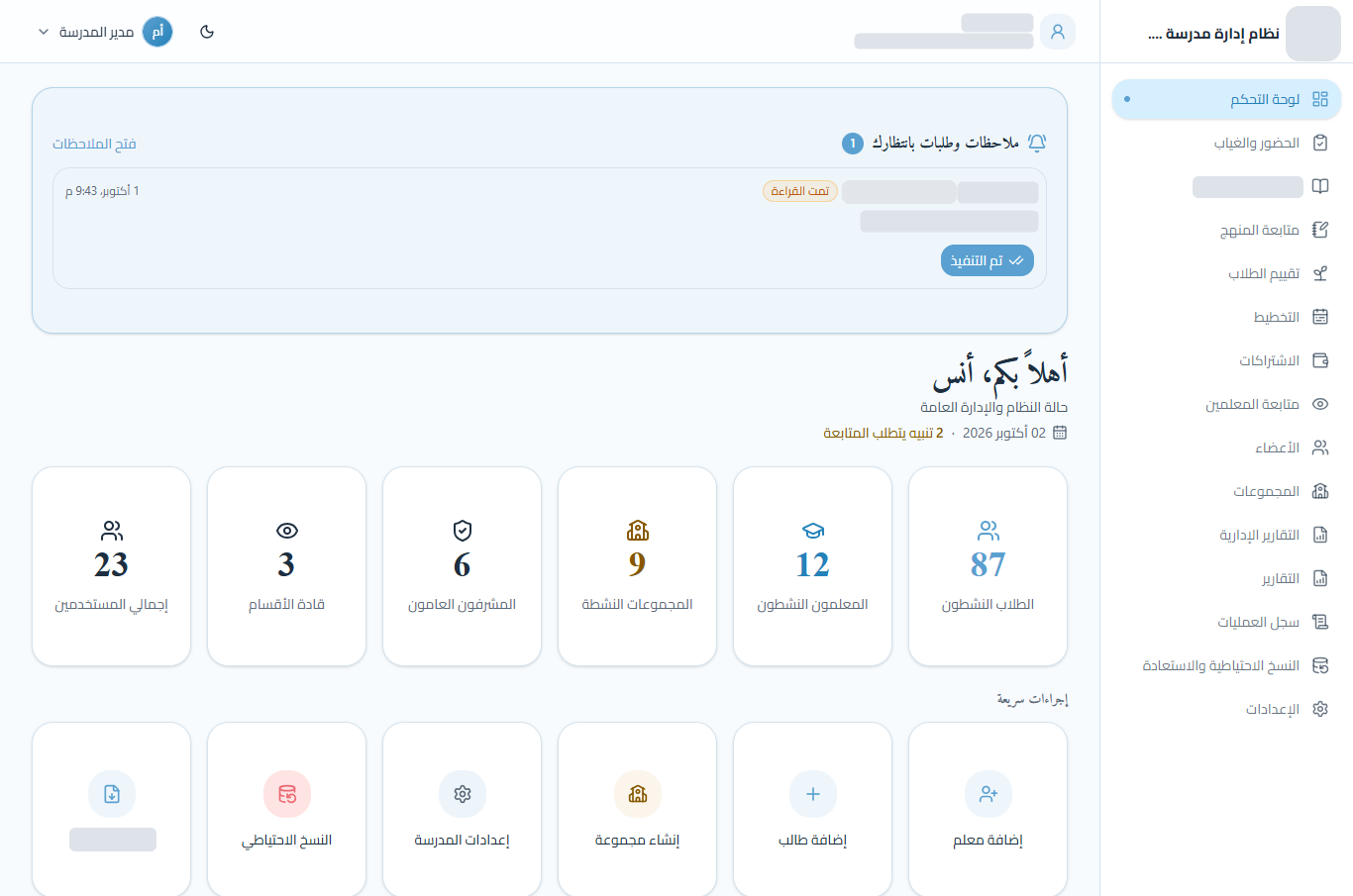
The school director's dashboard in Arabic: a note waiting for the director, counts of students, teachers, groups, supervisors, team leaders and users, quick actions, and the full navigation on the right. The school's name and logo are hidden.
The director's dashboard. Names, personal details and the school's name and logo are hidden.
2 applications
A staff application for the school and a portal for parents
4 primary roles
Super admin, admin, team leader and teacher, plus limited accounts
152 endpoints
From attendance and progress tracking to finance, reports and backups
800+ checks
Automated tests in 58 suites across the API, the browser and C#

The problem

A school runs on many small records kept by many people. On paper and in spreadsheets, those records disagree, and nobody can tell who changed what.

  • Students and groups

    Who is in which group, under which teacher, and who left.

  • Attendance and progress

    Every session's attendance, and how each student is progressing.

  • Finance

    Monthly subscriptions, partial payments, and who is behind.

  • Administration

    Staff who should only see their part, and reports leadership can trust.

One system, two sides

Staff and families use the same data through two separate applications. Staff run the school. A parent sees one child and nothing else.

For the school

The staff application

  • DirectorEverything, including accounts, backups and system health
  • AdminRuns the school day to day
  • Team leaderSupervises their teachers and groups
  • TeacherAttendance, progress and evaluations for their own groups

For parents

The family portal

  • ProgressAttendance, learning progress, evaluations and medals
  • Weekly assignmentThe parent marks it read, then done
  • SubscriptionsWhat has been paid and what is still due
  • Teachers' notesComments on progress and evaluations

Core workflows

Every module has its own API endpoints, stored procedures and screens. The interface is Arabic only, and student and staff names, and the school's own branding, are hidden in every screenshot because the data is real.

Teaching

Attendance · Progress tracking · Curriculum and exams · Evaluations and medals · Weekly assignments

People

Students and groups · Transfers and archiving · Supervision · Staff accounts

Finance

Monthly subscriptions · Partial payments · Financial reports

Administration

School-wide reports with PDF and Excel export · Planning and notes · Audit log · Backups and health
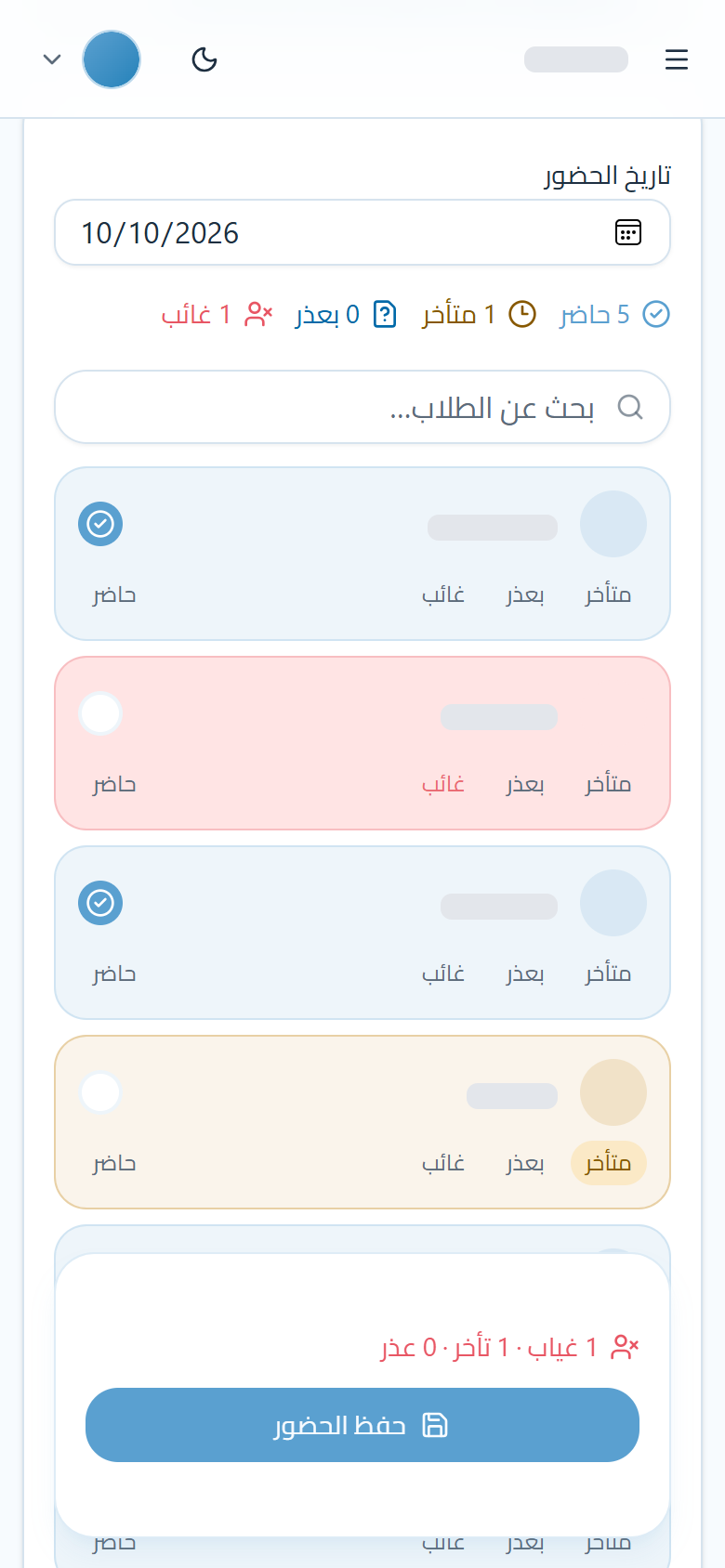
Attendance for one group on a phone, in Arabic: the session date, counters showing 5 present, 1 late, 0 excused and 1 absent, the student list with one student marked absent and one late, and the save bar at the bottom.

Teacher, on a phone

Taking attendance

Built for one hand during the session. Everyone starts present, so the teacher only taps the exceptions, and the counters update with each tap.
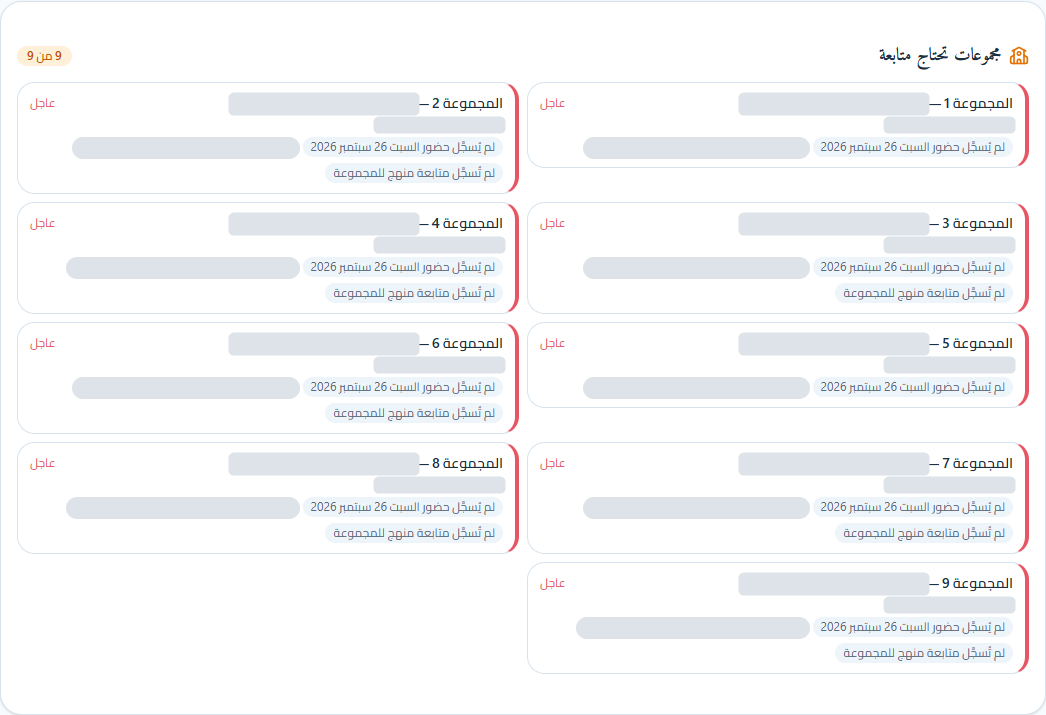
Dashboard panel listing nine groups that need follow-up, each marked urgent, with tags for attendance not recorded since Saturday and no curriculum follow-up. Group names and one kind of tag are hidden.

Director and admins

What needs follow-up

The dashboard points at gaps, not only totals: groups with no attendance since Saturday, students with no progress recorded this week, or no curriculum follow-up.
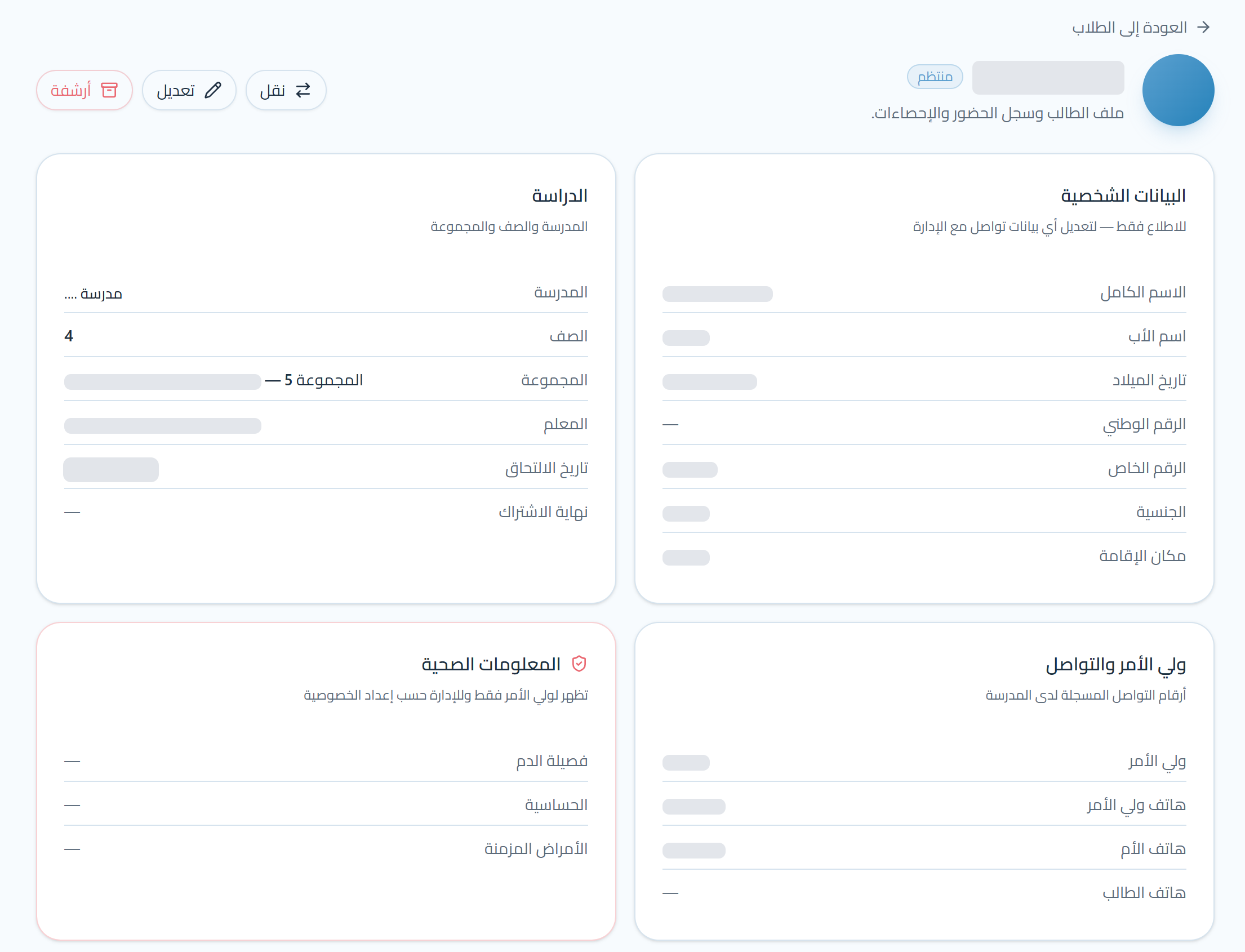
A student's profile in Arabic: transfer, edit and archive buttons, and cards for personal details, study, guardian and contact, and health information. Names, phone numbers and other personal values are hidden.

Admins and teachers

The student profile

One page per student: study, guardian and health details, with attendance, progress, evaluations and the family account below. An archived student stays in the archive with no time limit and can be restored.
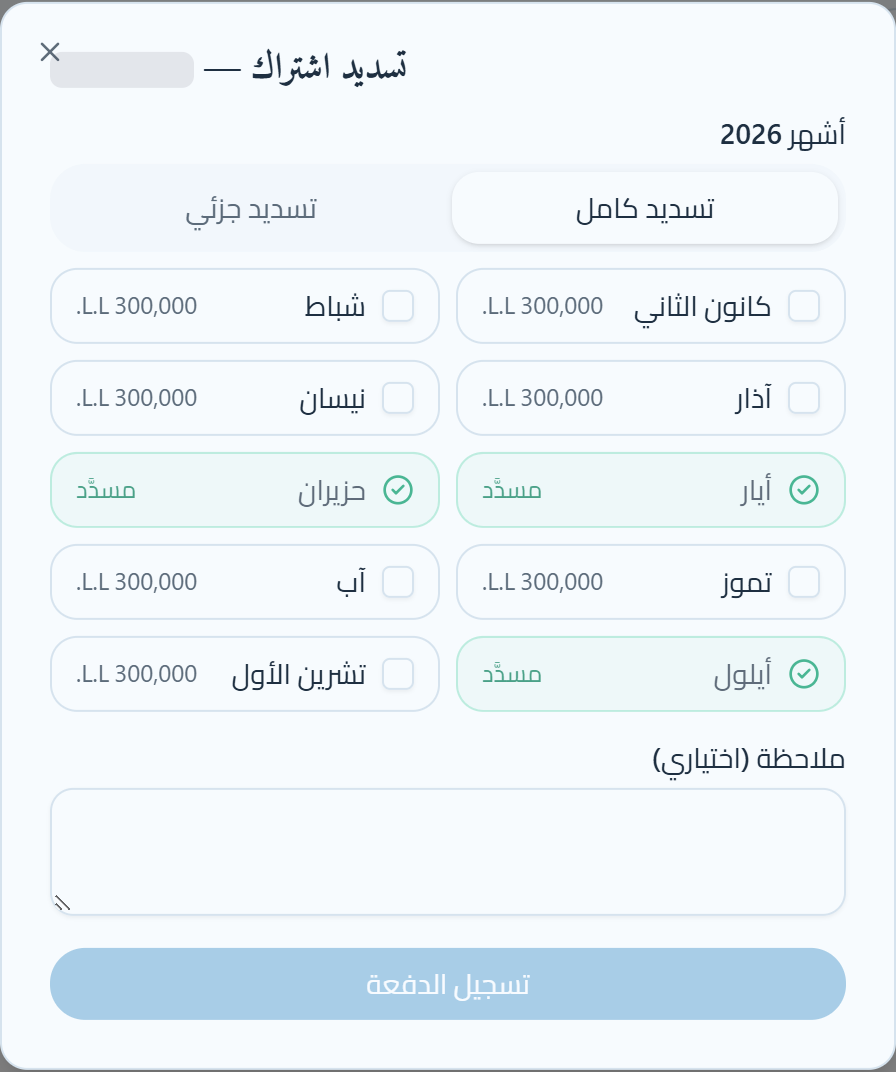
Subscription payment dialog in Arabic for 2026: a choice between full and partial payment, the months January to October with May, June and September marked paid and the rest at 300,000 Lebanese pounds each, an optional note, and a record payment button.

Subscriptions account

Recording a payment

Payments are recorded against months, not as loose amounts. A partial payment is split evenly over the months it covers, so every student's balance can be explained.
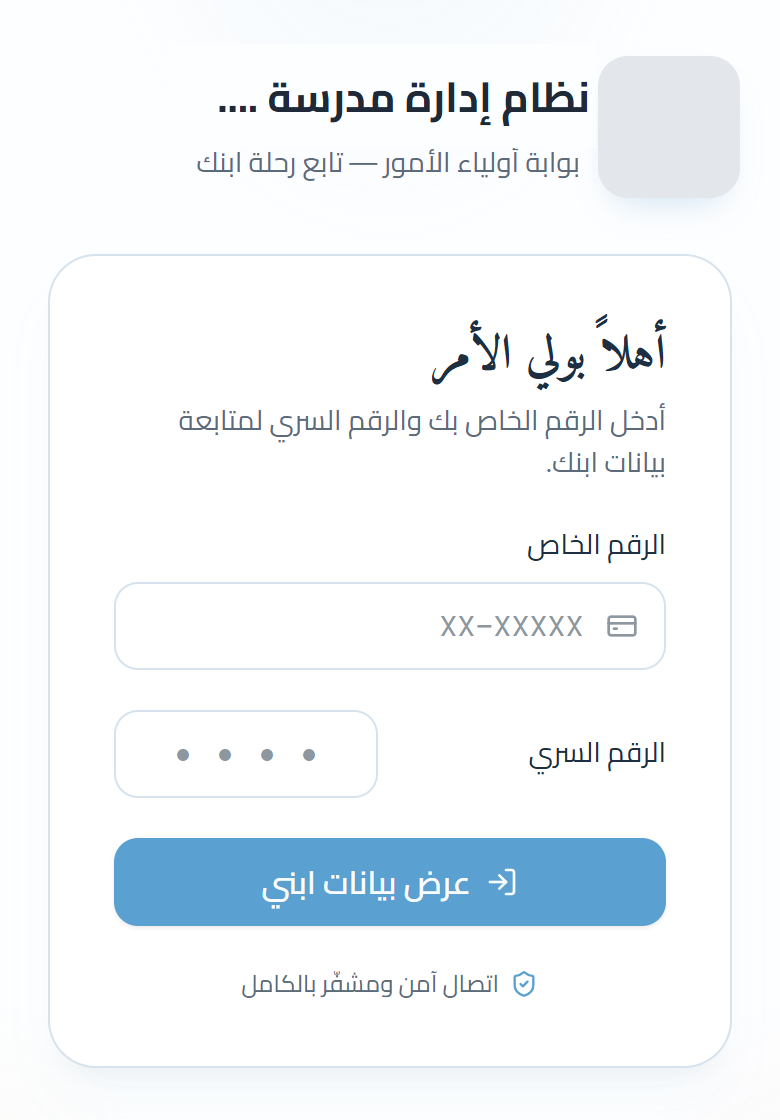
The family portal sign-in on a phone, in Arabic: a welcome for parents, a field for the student's number in the format XX-XXXXX, four boxes for the PIN, a button to view the child's data, and a note that the connection is secure. The school's logo and name are hidden.

Parent, on a phone

The family portal

A parent signs in with the student's number and a 4-digit PIN, nothing else. After that they see only their own child: attendance, progress, evaluations and medals, subscriptions and teachers' notes.

The weekly assignment appears as one small alert. The parent marks it read, then done, and only that student's teachers and the administration see those steps.

Architecture

Every request follows the same path. There is no ORM: the API calls stored procedures directly.

Browser

Staff application React and TypeScript, Arabic and right to left, on desktop and phone
Family portal Part of the same React app, with its own sign-in and layout, showing only the family's own children

Two kinds of token, with different keys and audiences, so a family token can never act as staff

API

ASP.NET Core (.NET 10)

Each request passes through these layers, in order

  1. Controller: HTTP and its policy
  2. Service: the rules and who may touch which class
  3. Repository: ADO.NET, no ORM

Endpoints name a policy or require a signed-in account, for example

  • Staff
  • Admin only
  • Super admin only
  • Family only
  • Read-only views

A login that may only run stored procedures

Database

SQL Server: 162 stored procedures over 32 tables Transactions, edit windows and audit rows run inside the procedure. The API's login is denied every direct read and write on the tables.
  • Each rule lives in one place

    Rules sit in a procedure or a single service, never in the screens, so two screens cannot disagree.

  • Each layer has one job

    Controllers handle HTTP, services handle rules, repositories handle data. Each is easy to read and to test.

  • SQL kept close to the data

    Transactions, checks and audit rows run in the database, in one step, without an ORM in between.

One request, step by step

A teacher tries to correct attendance a little over three days after recording it. Teachers may correct their own records for 72 hours. This is the path the request takes, and where it stops.

  1. Who is calling?

    A staff token, not a family one. The account is re-checked on every request, with a short cache.

    401

  2. The endpoint's policy

    Staff: one of the four staff roles.

    403

  3. A valid request

    Each status is absent, late or excused, and an excused absence needs a reason.

    400

  4. This person, this class

    Admins reach every class, a teacher only their own classes, a team leader only the classes of the teachers they supervise.

    403

  5. The stored procedure's rules

    In one transaction, in this order: the class is active, the session is this teacher's own, and it was recorded less than 72 hours ago.

    400
    409
    403

  6. Saved

    The session and each student's status are written in the same transaction.

    200

Stopped at step 5. The rule lives in the procedure, so no screen or endpoint can skip it. The answer comes back in Arabic, like the interface.

Request

PUT /api/v1/classes/{classId}/attendance
Authorization: Bearer <staff token>
Content-Type: application/json

{
  "date": "yyyy-mm-dd",
  "overrides": [
    { "studentId": "…", "status": "late" }
  ]
}

Response

HTTP/1.1 403 Forbidden
Content-Type: application/json; charset=utf-8

{
  "title": "غير مسموح",
  "status": 403,
  "detail": "انتهت مهلة تعديل هذا السجل. يمكن للإدارة تعديله.",
  "instance": "/api/v1/classes/…/attendance"
}

In English: "Not allowed. The time allowed to edit this record has passed. The administration can edit it."

From the browser suite e2e-windows: the same correction is accepted at 71 hours and refused at 73.

The tables behind that answer

An excerpt of the schema: the tables that decide who may touch a class, and the two columns that close the edit window.

Schema excerpt for correcting attendanceprofiles holds the staff accounts and their role. class_teachers links teachers to classes, and teacher_supervision links team leaders to teachers: together they decide which classes a person may touch. students belong to a class. attendance_sessions belong to a class and record who recorded them and when; attendance_records hold one status per student per session. A teacher may change a session only if they recorded it, within 72 hours.teacher_supervisionidPKteam_leader_idFKteacher_idFKclass_teachersidPKteacher_idFKclass_idFKprofilesidPKfull_nameroleis_activeclassesidPKnameis_activestudentsidPKfull_nameclass_idFKstatusattendance_sessionsidPKclass_idFKdaterecorded_byFKrecorded_atattendance_recordsidPKsession_idFKstudent_idFKstatusexcused_reason72-hour windowA teacher may change asession only if theyrecorded it, within 72hours. Administratorshave no limit.Procedures onlyThe API's database loginmay run stored procedures.Reading or writing a tabledirectly is denied.Access to a class:admins reach every class,a teacher throughclass_teachers, a teamleader throughteacher_supervision.PK this table's keyFK points to another table's key
Seven of the 32 tables, with the columns this request touches. Arrows run from a column to the table whose key it holds.

Scroll sideways to see the whole diagram.

Engineering decisions

The four choices that shaped the system most.

01

Authorization beyond roles

Problem
Two teachers have the same role but different students, so a role alone cannot decide access.
Decision
One access guard decides which groups and students each account can reach. Teachers reach students through their groups, team leaders through their teachers, and admins reach everything.
Result
Every request is checked against the data, not just the menu, so typing a hidden page's address redirects. The view-only department has separate checks that no write path uses.

02

A database user that can only run procedures

Problem
If the API could write to tables directly, it could skip the checks and the audit.
Decision
The API connects as a least-privilege user that can execute stored procedures and has no rights on any table.
Result
Even a bug in the API cannot run arbitrary SQL against the tables. Secrets come from the environment, and the API won't start in production without a signing key.

03

Business rules enforced in the transaction

Problem
A half-saved attendance session, or an old record that quietly changed, would make every report wrong.
Decision
Attendance is saved as one transaction: the session, its records and the audit row together. Whoever recorded something can correct it for 72 hours (attendance) or 24 hours (everything else). After that, only admins can. One SQL function makes this decision for every record type.
Result
Duplicate sessions are impossible. If a teacher tries to overwrite another teacher's session, the API refuses with a clear Arabic message.

04

The family portal as a separate security domain

Problem
A parent must never reach another child's data, even by editing a URL.
Decision
Families have their own sign-in, token audience, signing key and API client. The student always comes from the token, never from the URL.
Result
Staff and family tokens do not work on each other's endpoints. A new PIN or an archived student ends the session within seconds.

Security and reliability

What protects the data and keeps the system running.

  • JWT authentication

    Accounts are re-checked on each request, with a short cache

  • Separate staff and family domains

    Different keys, audiences and clients

  • Policy-based authorization

    Endpoints name a policy or require a signed-in account

  • Resource-level access

    Checked for each group and each student

  • Least-privilege database

    The API can only execute procedures

  • Audit log

    Who did what and when. Sign-ins are kept 90 days, other actions 12 months

  • Rate limiting and sign-in protection

    Per-address request limits, lockouts that grow longer after wrong passwords or PINs, and the same answer whether an account exists or not

  • Verified backups

    Daily and monthly backups, each checked after it is written

  • A cache that cannot go stale

    Read-only answers kept in memory per person for a few seconds, thrown away the moment any change succeeds

  • Idempotent scheduled jobs

    Monthly reports and subscription months can run again, or catch up after downtime, without duplicates

Testing

800+ automated checks in 58 suites. They run against a real local database and clean up the test data they create. On every push, GitHub Actions builds the API, runs the C# unit tests, and lints, type-checks and builds the site.

API and business-rule checks

Node, against the running API

Roles, scoping, validation and time windows are tested at their exact boundaries. For example, a teacher can correct attendance at 71 hours and is refused at 73.

Browser checks

Playwright, end to end

Real pages, signed in as each kind of account, on desktop and phone widths, including exports, dialogs and page speed.

C# unit tests

xUnit, no database

Logic that does not need a database, such as sign-in throttling, the server cache and scheduled cleanup jobs.

The pipeline

From .github/workflows/ci.yml. It runs on every push and every pull request, and needs no database and no secrets.

API build and unit tests

Ubuntu, .NET 10

  1. Build the API in Release
  2. Run the 27 C# unit tests

Site lint, type-check and build

Ubuntu, Node 24

  1. Install from the lock file (npm ci)
  2. Lint
  3. Type-check and build

Not in CI: the 58 check suites, with their 800+ checks. They need signed-in accounts and real data, so I run them on my machine, one suite at a time, against the running API and site and a local database.

A run on my machine

The same command the API job runs.

$ dotnet test tests/unit/••••••.Api.Tests.csproj -c Release --nologo
A total of 1 test files matched the specified pattern.
Passed!  - Failed:     0, Passed:    27, Skipped:     0, Total:    27, Duration: 1 s - ••••••.Api.Tests.dll (net10.0)
Run on 2 November 2026 on commit 78deecb, with .NET 10. The browser and API suites run separately, against a local database. The private project name is masked as ••••••.

What I learned

  1. Business rules shape the architecture

    The question "who can correct this record, and until when?" shaped the database more than any screen did.

  2. Authorization is more than roles

    Two teachers can share a role without sharing students, so access has to be checked against the data itself.

  3. Production thinking starts on day one

    When real people depend on a system, verified backups, health checks and clear errors matter as much as features.

Want to see it running?

I'm happy to walk you through the live system and the code.

Built with

  • React and TypeScript interface
  • C# and ASP.NET Core (.NET 10) API
  • ADO.NET data access
  • SQL Server stored procedures
  • Playwright and xUnit testing