
Featured projects / Case study

Hospital Information System

A full system for a 100-bed general hospital, from the emergency room to the ward, the ICU, the theatre and the final bill, with a home screen built for each nurse and doctor.
Built with
React, TypeScript, ASP.NET Core (.NET 10), EF Core, SQL Server
Status
Built solo, from requirements to tests, and now offered to hospitals.
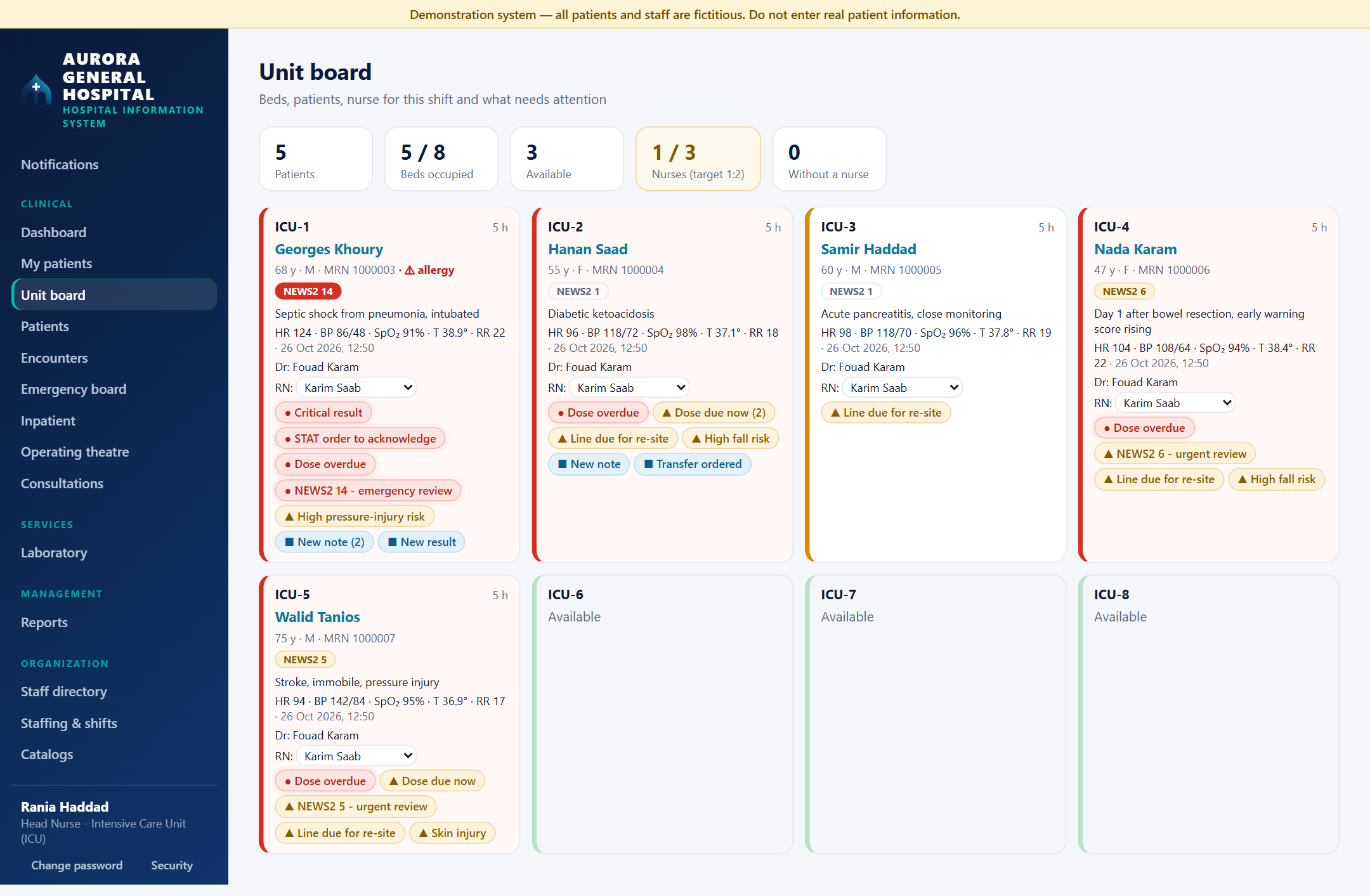
The ICU unit board: five patients, five of eight beds occupied, one of three nurses against a 1:2 target. Each bed tile shows the patient, NEWS2 score, latest vital signs, attending doctor, the assigned nurse and colour-coded alerts such as critical result, dose overdue and line due for re-site; three beds are available.
The ICU unit board on the demo hospital. Every patient and staff name is fictional.
100-bed
General hospital, emergency to discharge
15 modules
Clinical, services, wards, business and integration
13 roles
Each granted for a scope and a date range
260
API endpoints behind every screen
212
Automated tests: 184 backend (155 of them integration on a real SQL Server), 25 unit, 3 browser

The problem

Hospital software has to be strict where mistakes hurt people: who may approve a drug, who may see a patient, and whether anyone can quietly change the record afterwards.

  • Patients and care

    One record per patient, shared by every department that treats them.

  • Medication and diagnostics

    Orders that pass through a second, independent pair of hands.

  • Money and supplies

    Charges, insurance and stock that always reconcile.

  • Accountability

    A record of who did what that nobody can edit, not even an administrator.

One patient, one encounter

The patient is the centre of the model. Every visit opens an encounter, and every clinical workflow hangs off it.

Kept for life
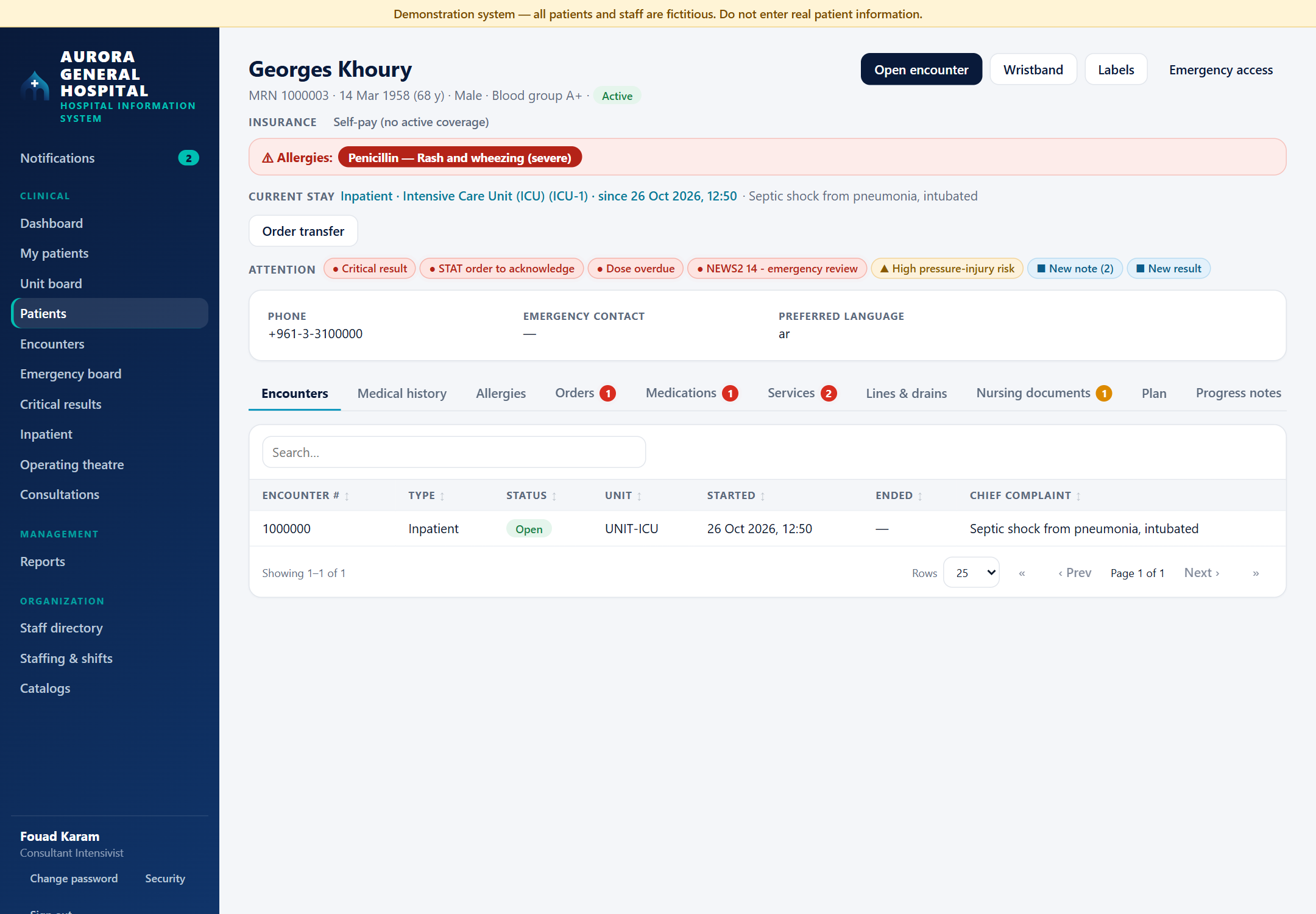
A patient chart: name, medical record number, blood group and insurance, a red penicillin allergy banner, the current ICU stay, an attention strip with critical result, STAT order, dose overdue and NEWS2 14 chips, wristband and label buttons, and tabs for encounters, history, orders, medications, services, lines, nursing documents, plan and notes.

The patient chart

Allergies on every screen, the current stay, and an attention strip whose chips jump to the tab where the work is done. Wristband and barcode labels print from the header.

Opened per visit

The encounter

  • DocumentationNotes, diagnoses, vital signs
  • OrdersPrescriptions, labs, imaging, consults
  • CareAdmission, medication rounds, surgery
  • ChargesEverything billed for the visit

Core workflows

A shift on the ward, from the nurse's first look to the audit trail that records it. Screenshots come from the running system.
  1. Nurse
  2. Shift
  3. Doctor
  4. Deterioration
  5. Safety
  6. Access
  7. ICU
  8. Accountability
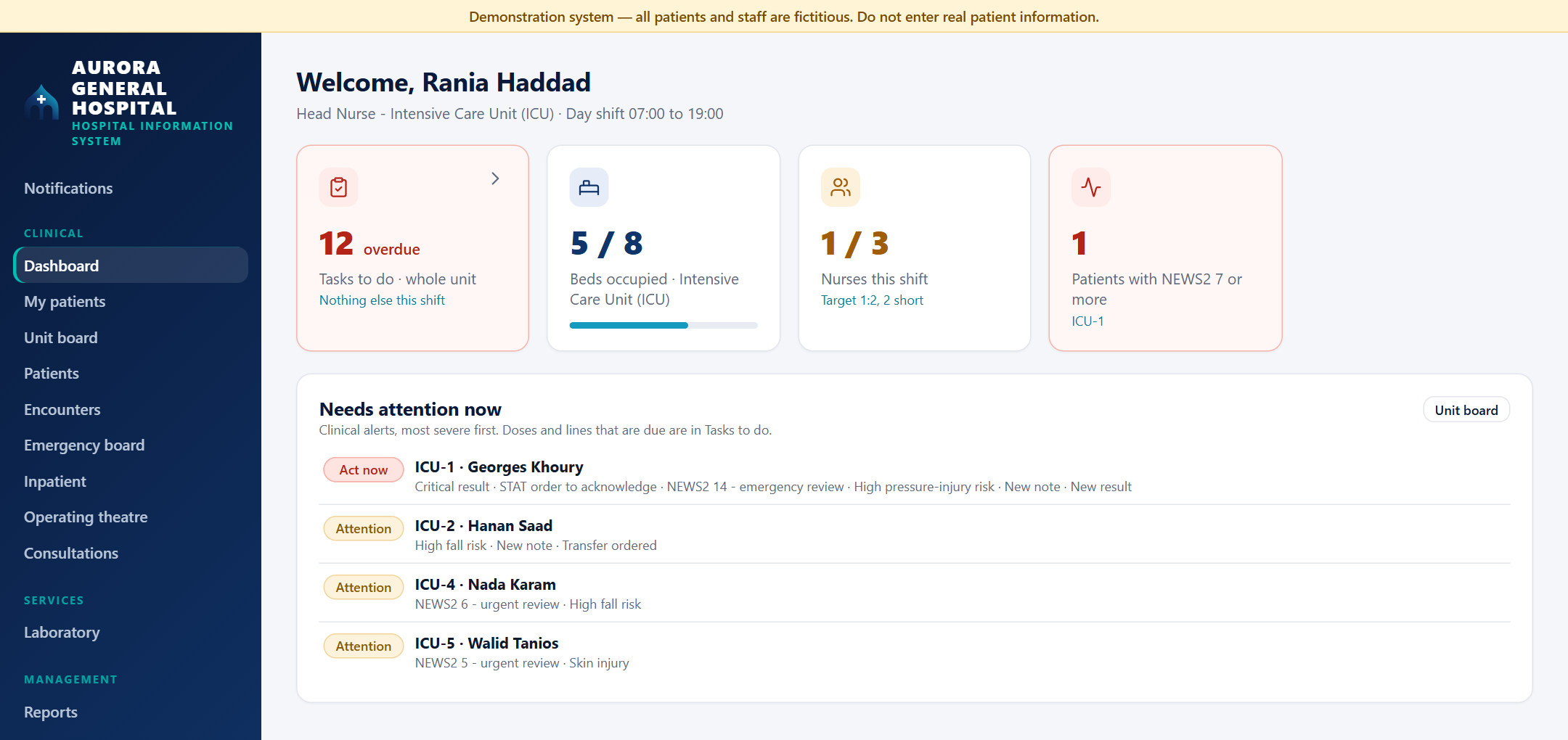
The head nurse's dashboard: 11 overdue tasks for the whole unit with the next one due, 5 of 8 beds occupied, 1 of 3 nurses against a 1:2 target, one patient with NEWS2 7 or more, and below it the patients who need attention now, most severe first.

1Nurses

The nurse's home screen

Opens on what matters this shift: tasks overdue, beds, staffing against the ward ratio, and the patients who need attention now, most severe first.
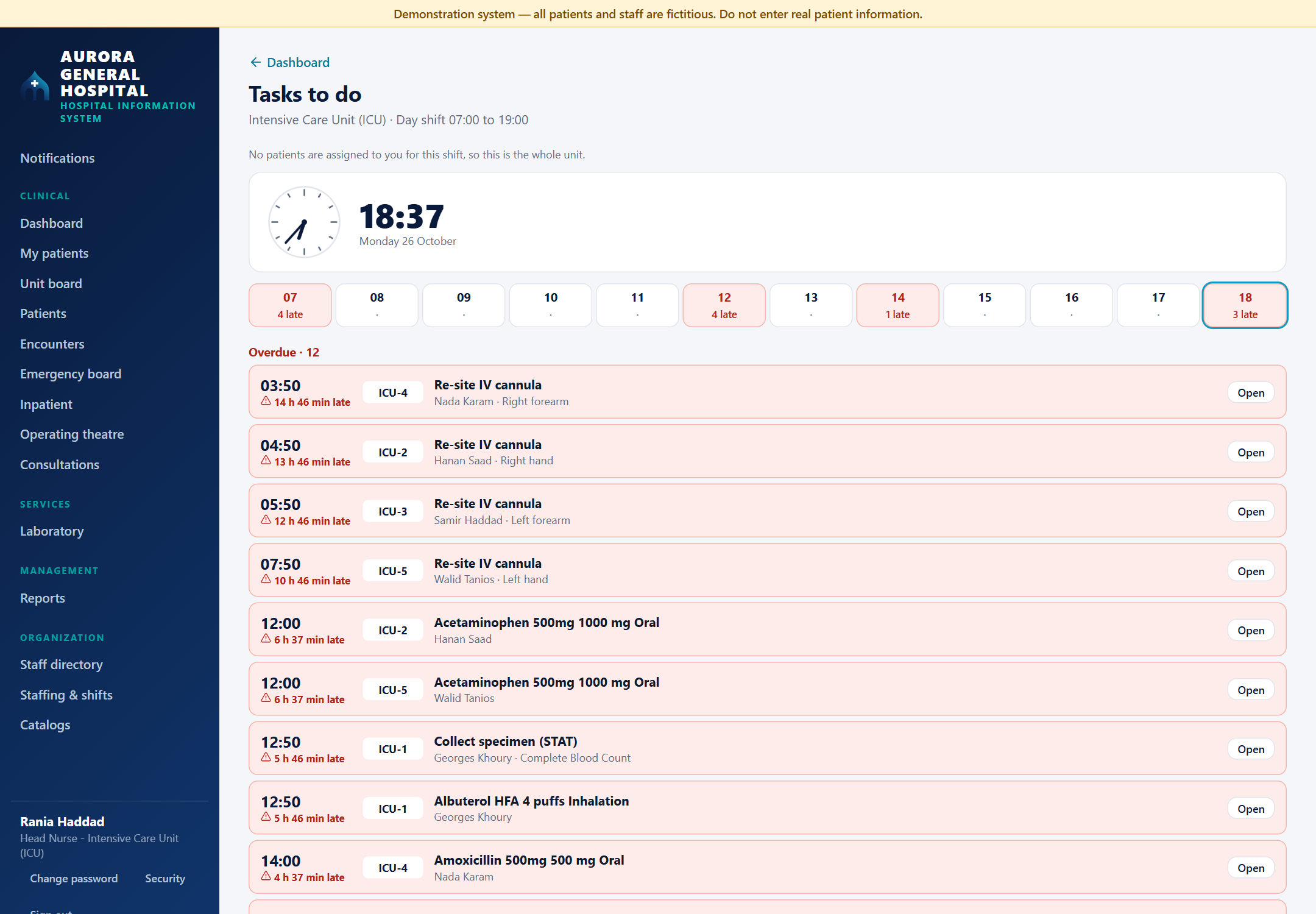
Tasks to do: a clock, one tile per hour of the day shift with late hours in red, then overdue tasks with their time, bed, patient and how late they are: IV cannula re-sites, doses and a STAT specimen.

2Nurses

Tasks to do, hour by hour

Every dose, line re-site and STAT specimen, with its time and bed. A task turns red the minute it is due and leaves the list by itself once it is charted.
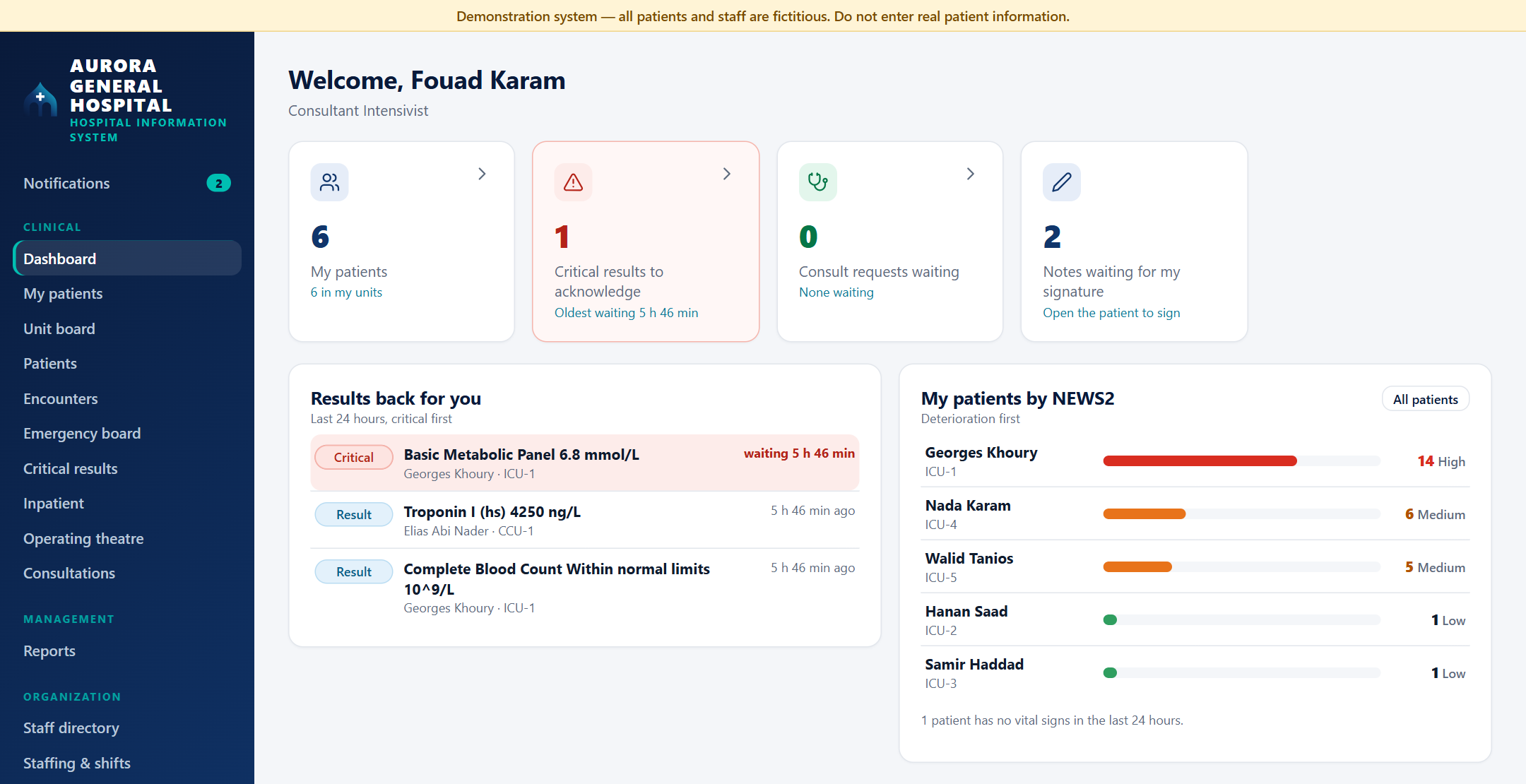
The doctor's dashboard: six patients, one critical result to acknowledge waiting more than five hours, consult requests and notes waiting for signature, results back in the last 24 hours, and the patients ranked by NEWS2 with coloured bars.

3Doctors

The doctor's home screen

Critical results to acknowledge, red once they pass the laboratory target, results back in the last 24 hours, and the patients ranked by NEWS2 so the one who is deteriorating comes first.
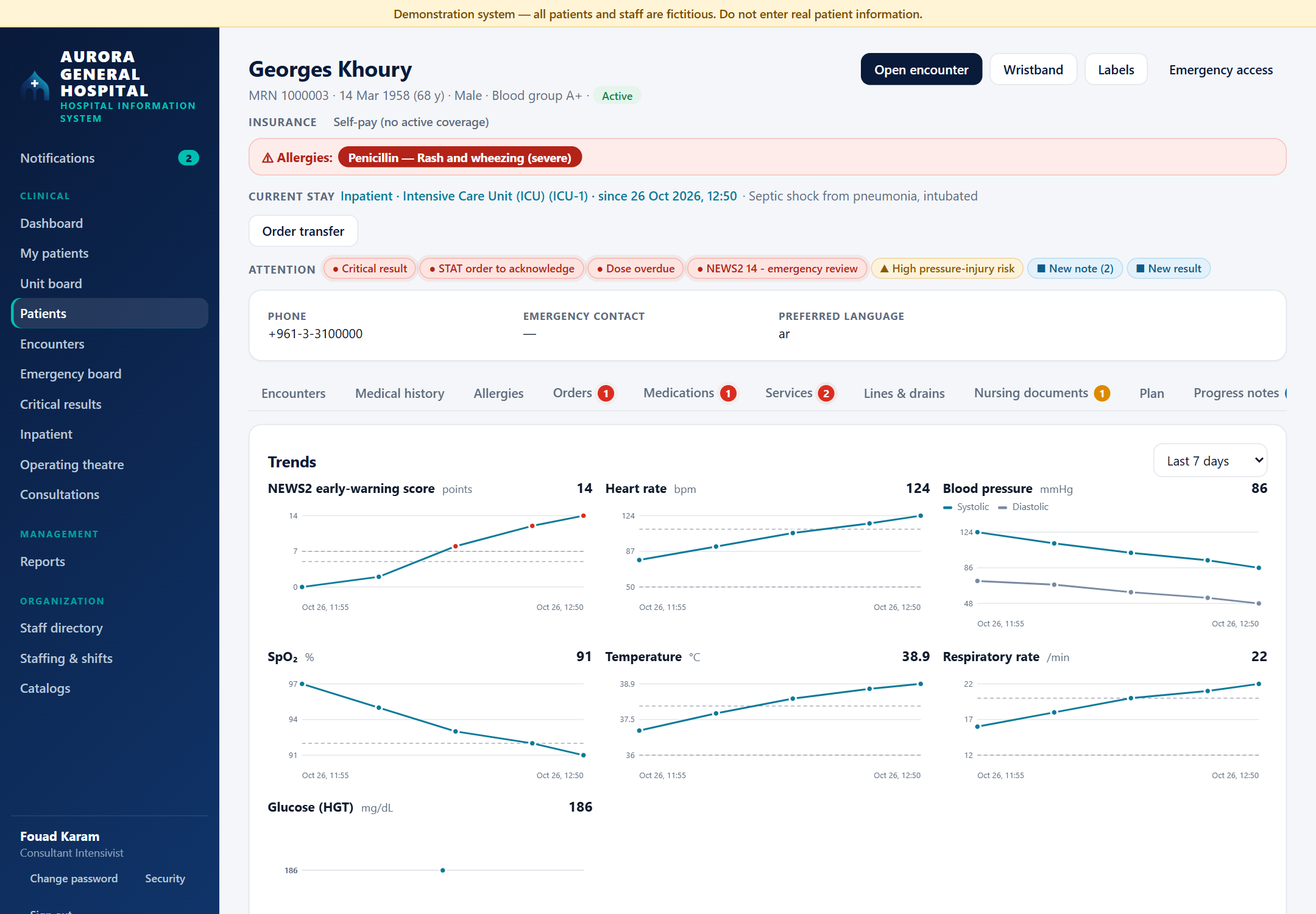
Trend charts on a patient chart: NEWS2 rising to 14, heart rate, blood pressure, oxygen saturation, temperature, respiratory rate and glucose over the last seven days.

4Doctors and nurses

NEWS2 and the trends behind it

The early-warning score is computed from the latest vital signs, including supplemental oxygen, and charted next to each sign so the cause of a rise is visible.
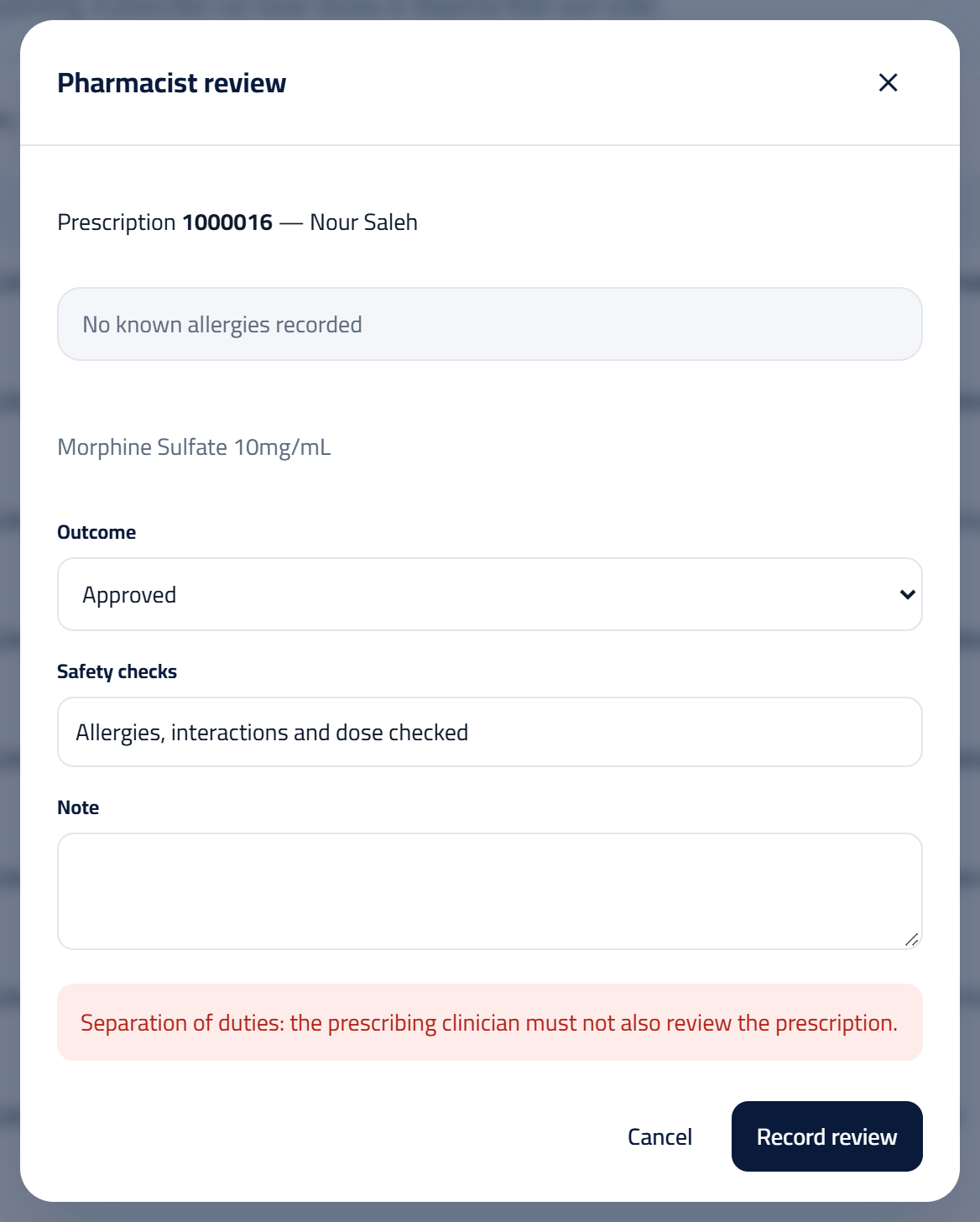
The pharmacist review dialog for a morphine prescription, showing the refusal: Separation of duties: the prescribing clinician must not also review the prescription.

5Pharmacist

A second pair of hands

The doctor who wrote this morphine prescription tries to approve it. The API refuses and logs the attempt, even though the account holds both permissions.
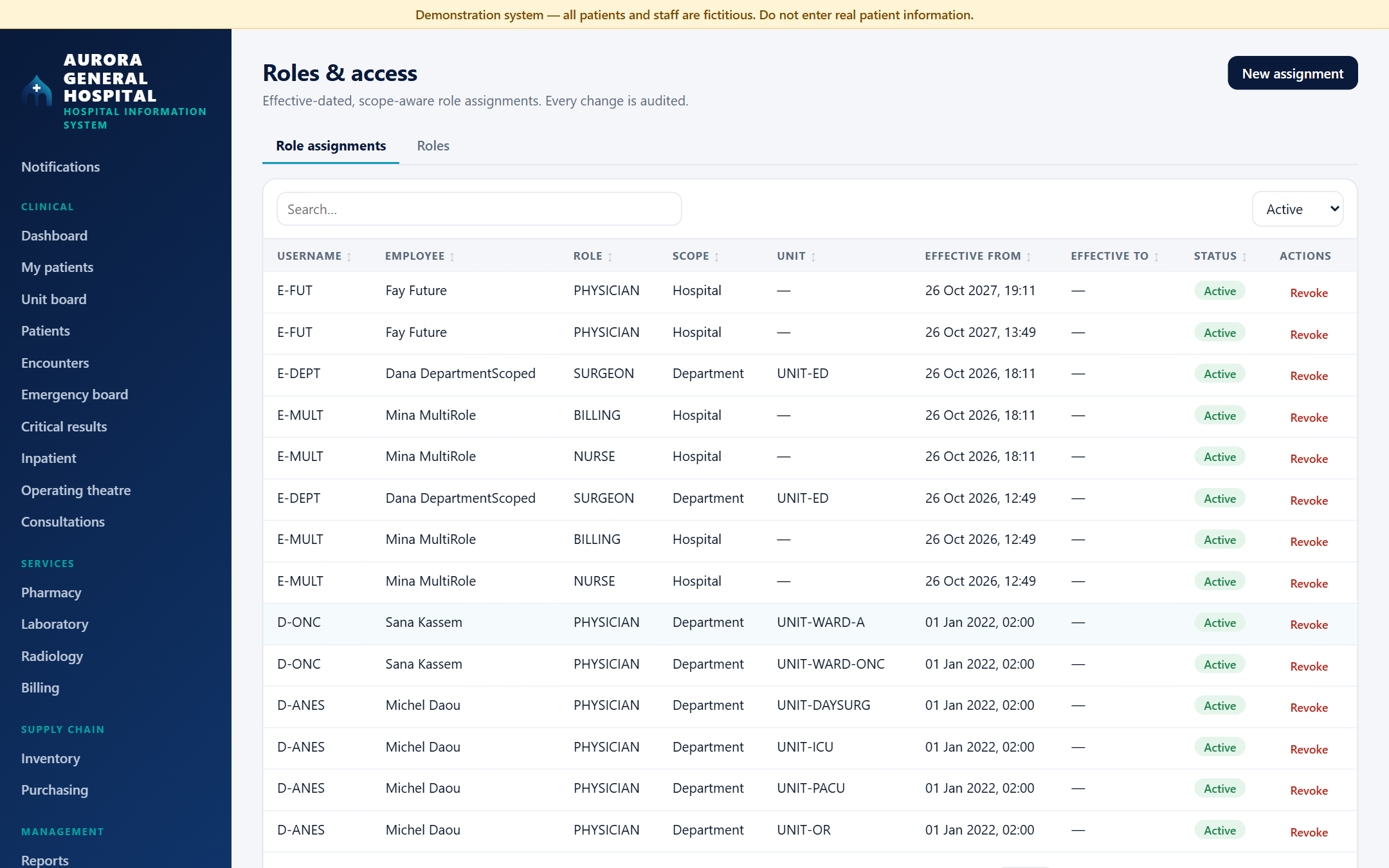
Roles and access: role assignments with username, employee, role, scope, unit, effective dates and status. Every change is audited.

6IT administrator

Who may do what, where and when

Each role is granted for a scope and a date range. A grant can start in the future or expire, and the change takes effect on the next request.
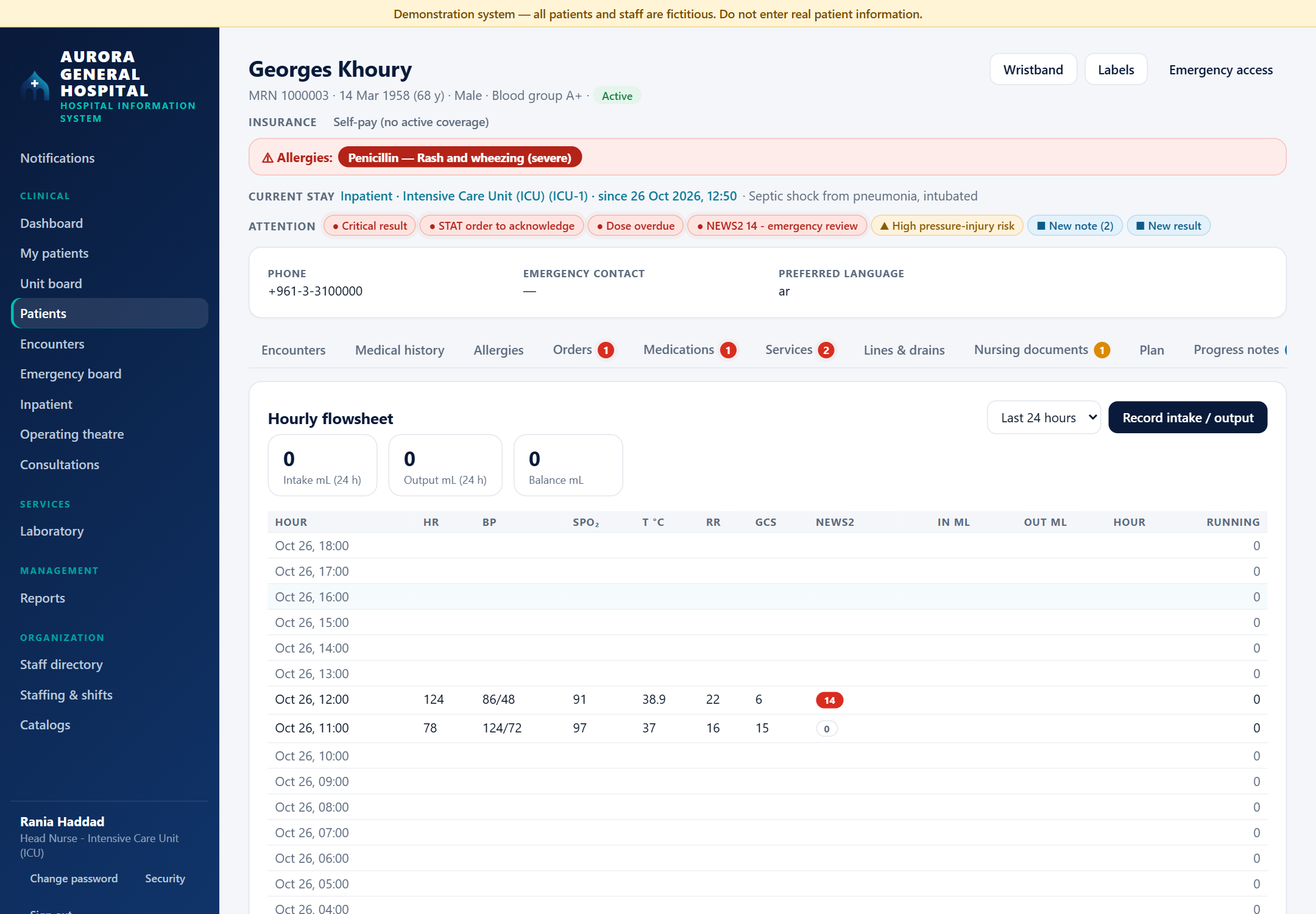
The hourly ICU flowsheet: intake, output and balance totals, then one row per hour with heart rate, blood pressure, oxygen saturation, temperature, respiratory rate, GCS and NEWS2.

7ICU nurses

The hourly flowsheet

One row per hour for vital signs and NEWS2, with intake, output and a running fluid balance.
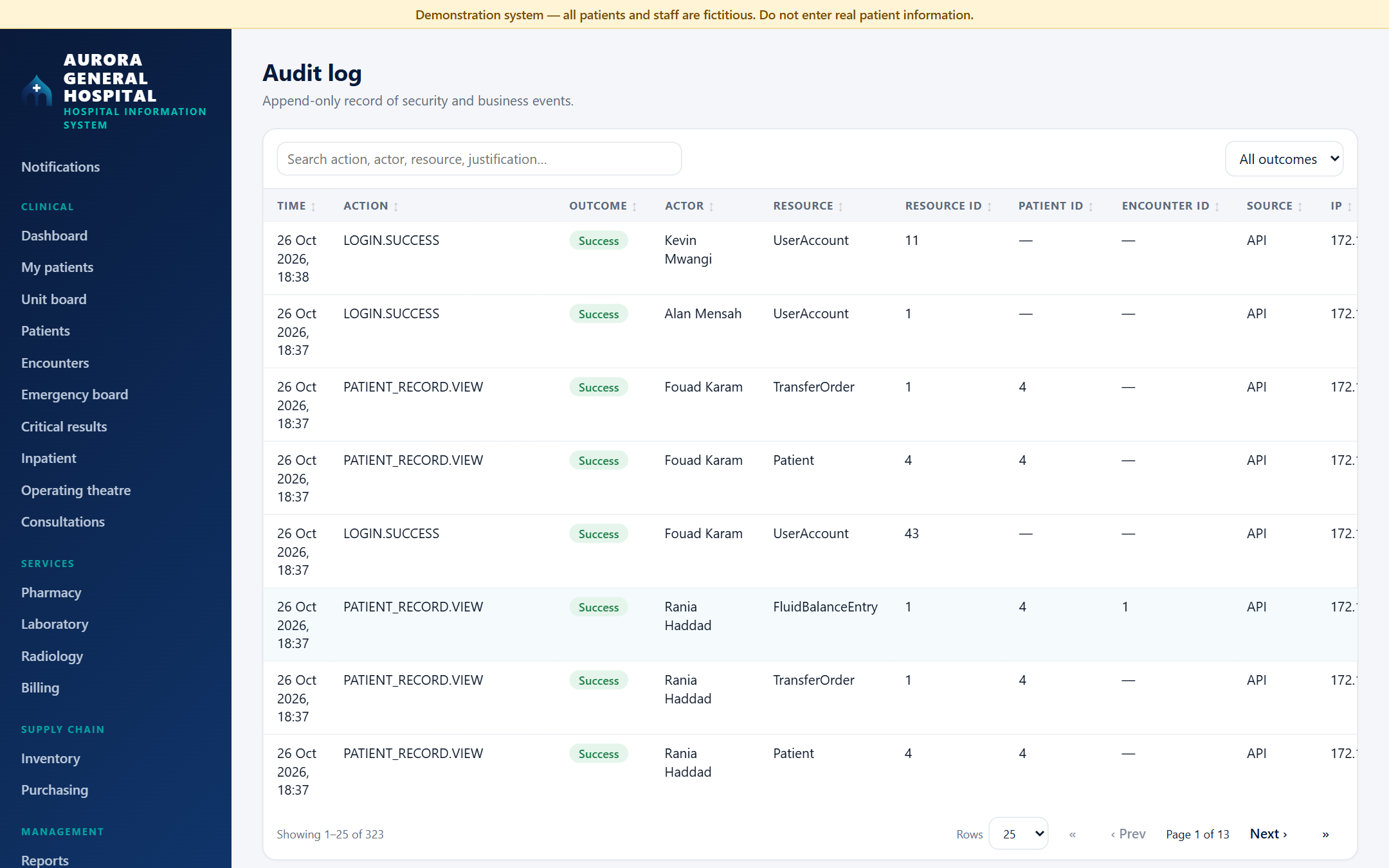
The audit log: sign-ins and patient record views with time, action, outcome, actor, resource, patient, encounter, source and address.

8Auditors and IT

The audit log

Sign-ins, record views, clinical and financial changes and permission refusals, with who, what and where. Rows are append-only: a database trigger refuses any change.

Built for the ward

The features a nurse or doctor reaches for every hour. Everything is derived from the chart on read, so nothing can drift out of date.

  • Medication schedule

    Ward dose times, with due and overdue doses and alerts

  • Unit boards

    Beds, nurse per shift, attending doctor and staffing against the ratio

  • NEWS2 early warning

    Scored from the latest vital signs, with trend charts

  • Wristbands and labels

    A red allergy band and MRN barcode stickers, printed from the chart

  • Perioperative pathway

    A pre-op checklist that gates the case start, the intra-op record and Aldrete recovery scoring

  • Final bill at discharge

    Tariffs by department, Lebanese payers with coverage shares, split between payer and patient

  • Transfers between units

    Ordered by the doctor, accepted by the receiving ward

  • FHIR R4

    A read-only interface for other hospital systems

Architecture

Modular Monolith

One deployable API, split into 15 modules whose dependencies point one way. Every request passes the same pipeline, then the checks of the endpoint it reaches.

Browser

React 19 and TypeScript The screens of each module, and a home screen for each role

HTTPS, with a 15-minute token that names the account and nothing else

API

ASP.NET Core (.NET 10), one deployable

Every request, in this order

  1. Correlation ID
  2. Error handler
  3. Security headers
  4. HTTPS
  5. Size limit
  6. Authentication
  7. Rate limits

15 modules, each with its own endpoints

  • Access
  • Patients
  • Inpatient
  • Clinical
  • Diagnostics
  • Pharmacy
  • Surgery
  • Finance
  • Supply chain
  • Workforce
  • Dashboard
  • Communication
  • Reporting
  • Interop (FHIR R4)
  • Platform

Shared by every module

  • Permission and scope
  • Separation of duties
  • Audit
  • Notifications

Writes and reads take different paths

Data

EF Core The model, the migrations and every write, saved in one transaction with its audit row
ADO.NET A versioned stored procedure for every search and report, with no dynamic SQL

A least-privilege login at runtime

Database

SQL Server Constraints and triggers. The audit trail, vital signs, medication administrations and the stock ledger are append-only, and posted charges and payments cannot change.
  • One deployable

    Simple to run and test, with each module owning its endpoints and screens.

  • Writes and reads split

    EF Core for the model, migrations and transactional writes. Stored procedures for every search and report.

  • Database as last guard

    Constraints and triggers enforce the rules no code path may skip.

One request, step by step

A doctor wrote a prescription and now tries to approve it as the pharmacist. Their account holds both permissions. This is the path the request takes, and where it stops.

  1. Who is calling?

    The token's account and its server-side session must still be open, and the person still employed.

    401

  2. Permission and scope

    order.medication.review at hospital scope, from the role assignments in force today, read from the database on every request.

    403

  3. A valid request

    The outcome must be one the pharmacy knows.

    400

  4. Separation of duties

    The reviewer must not be the prescriber. People are compared, not roles, so holding both roles does not help.

    403

  5. The right state

    Only a new or active prescription can be reviewed.

    409

  6. Saved together

    The review, the new status, the audit row and any notification commit in one transaction.

    200

Stopped at step 4. The refusal is written to the audit trail too, with its reason.

Request

POST /api/prescriptions/{id}/review
Authorization: Bearer <token>
Content-Type: application/json

{ "outcome": "Approved" }

Response, abridged

HTTP/1.1 403 Forbidden
Content-Type: application/problem+json

{
  "status": 403,
  "title": "Not permitted",
  "detail": "Separation of duties: the prescribing clinician must not also review the prescription.",
  "correlationId": "…"
}

From the integration test A_prescriber_cannot_review_or_dispense_their_own_prescription, which then has a real pharmacist approve and dispense the same prescription.

The tables behind that answer

An excerpt of the schema: the tables that request reads and writes. A role is granted for a scope and dates, and separation of duties compares two columns that point to the same person.

Schema excerpt for the prescription reviewRoleAssignment links a UserAccount to a Role for one scope (system, organisational unit, shift slot, surgical case or consultation) between EffectiveFrom and EffectiveTo. Roles map to permissions. UserAccount points to Employee. Prescription.OrderingClinicianId and PharmacyReview.PharmacistId both point to Employee and must be different people. Encounter points to Patient, Prescription to Encounter, PharmacyReview to Prescription. AuditEvent.ActorId points to Employee, and a trigger keeps AuditEvent append-only.RoleRoleIdPKCodeNamePermissionPermissionIdPKCodeRoleAssignmentRoleAssignmentIdPKUserAccountIdFKRoleIdFKIsSystemScopeOrganizationalUnitIdFKShiftSlotIdFKSurgicalCaseIdFKConsultationIdFKEffectiveFromEffectiveToUserAccountUserAccountIdPKEmployeeIdFKAccountStatusAuditEventAuditEventIdPKActorIdFKActionCodeOutcomeEmployeeEmployeeIdPKGivenNameFamilyNamePatientPatientIdPKMRNEncounterEncounterIdPKPatientIdFKUnitIdFKPrescriptionPrescriptionIdPKEncounterIdFKOrderingClinicianIdFKStatusPharmacyReviewPharmacyReviewIdPKPrescriptionIdFKPharmacistIdFKOutcomevia RolePermissionwhere it appliesthe dates it is in forceA trigger refuses any update or delete≠ Never the same personThe two highlighted columns arecompared on every review anddispense. A purchase order hasthe same rule as a constraint.PK this table's keyFK points to another table's key
Ten of the system's tables, with the columns this request touches. Arrows run from a column to the table whose key it holds.

Scroll sideways to see the whole diagram.

Engineering decisions

The choices that shaped the system most.

01

Scope-aware authorization

Problem
"Nurse" is not enough: a nurse works on one ward, from a date, and may leave. Roles baked into a token go stale.
Decision
The token carries only the account. Each request loads active role assignments and checks the permission at the right scope: system, hospital, department or work context.
Result
Revoking a role or disabling an account takes effect on the next request. A hospital-wide administrator still cannot manage roles, which needs system scope.

02

Separation of duties

By identity, not by role

Problem
The person who orders a drug, a result or a purchase must not approve it, and holding two roles must not open a loophole.
Decision
After authorization, a separate check compares the acting person with the one on the record: prescriber vs pharmacist, result author vs verifier, purchase raiser vs approver.
Result
Even an administrator holding every permission cannot approve their own order. For purchases, a database constraint enforces it too.

03

Append-only audit trail

Problem
An audit log is worthless if its rows can be changed, or a change can be saved without its audit row.
Decision
The audit row commits in the same transaction as the change, with the actor resolved on the server. A database trigger rejects any update or delete.
Result
The record holds even against a database administrator's mistake. The stock ledger is append-only the same way.

04

One search contract

Problem
Dozens of lists need search and sorting, and building that SQL from user input invites injection.
Decision
Searchable, paged lists are versioned stored procedures with the same contract: whitelisted sort columns, paging, no dynamic SQL.
Result
Those lists behave the same, and an unknown sort column is refused with a 400.

Security and reliability

What protects the data and keeps the system consistent.

  • JWT authentication

    15-minute tokens in a session with a 30-minute idle timeout, revoked when a password changes

  • Scope-aware authorization

    Permission checked for a scope and a date range

  • Separation of duties

    Nobody approves their own order, result or purchase

  • Append-only audit

    Sign-ins, clinical and financial changes and permission refusals, uneditable

  • Rate limiting and lockout

    Five failures lock an account for 15 minutes

  • Safe concurrency

    Row versions and locks stop double bookings and duplicate claims

Also: two-factor sign-in, server-side sessions that can be revoked, a least-privilege database login at runtime, sealed audit records and verified backups, PBKDF2 password hashing with forced change of temporary passwords, HTTPS, security headers, and no start-up with a weak signing key.

Testing

212 automated tests, wired into GitHub Actions: 184 backend tests (155 of them integration tests), 25 frontend unit tests and 3 browser journeys. Each integration run starts the real API against a fresh SQL Server database built from the real migrations and seed.

Backend and integration tests

xUnit · 184 tests · 155 on real SQL Server

Sign-in, scopes, separation of duties, the search contract, medication schedules, NEWS2, the dashboards and the final bill. When two people act on one record at once, exactly one succeeds.

Continuous integration

GitHub Actions

Warnings as errors, a check that migrations match the model, tests in a SQL Server container, then lint and build.

Unit and browser tests

Vitest · 25 tests · Playwright · 3 journeys

The task and shift-clock rules are unit tested; sign-in, patient registration and critical-result acknowledgement run end to end in a real browser.

The pipeline

From .github/workflows/ci.yml. It runs on every push to the main branch and on every pull request. Each database it uses is a throwaway container that lives only as long as the job.

Backend

Ubuntu, .NET 10, a SQL Server 2022 container

  1. Restore the packages and tools

  2. Build, with every warning treated as an error

  3. Check that the migrations match the model

  4. Fail on any NuGet package with a published vulnerability

  5. Run the 184 backend tests on a fresh database, with the API signed in as the least-privilege login. A missing server fails the run instead of skipping the tests.

  6. Write the idempotent migration script for the database administrator and keep it as a build artifact

Frontend

Ubuntu, Node 22

  1. Install exactly what the lock file lists

  2. Fail on any high-severity npm advisory

  3. Lint

  4. Run the 25 unit tests

  5. Type-check and build

Only when both jobs pass:

End to end

Ubuntu, a SQL Server 2022 container, Chromium

  1. Start the API: it migrates the empty database and seeds the sample hospital

  2. Start the front end

  3. Run the 3 Playwright journeys in a real browser

  4. On a failure, keep the Playwright report and the API log

A run on my machine

The frontend unit tests, with the same command the frontend job runs.

$ npm test
 Test Files  5 passed (5)
      Tests  25 passed (25)
Run on 2 November 2026 on commit b39a1db, with Vitest 5. The 184 backend tests and the 3 browser journeys are defined in the pipeline above, against its own SQL Server.

What I learned

  1. Access depends on where and when, not only on who

    A role means little without a scope and dates. Modelling that early saved the permission system from rewrites.

  2. The database is the last line of defence

    Rules that must never break belong in constraints and triggers too.

  3. Write the rules down before the code

    A written hospital profile, access rules and entity catalogue came first, then small verified batches.

Built to run a hospital

The full system, its documentation and its test suite are complete, and it is now offered to hospitals.

Built with

  • React 19 and TypeScript interface
  • C# and ASP.NET Core (.NET 10) API
  • EF Core writes and migrations
  • ADO.NET and stored procedures search and reports
  • SQL Server database
  • xUnit, GitHub Actions, Docker testing and delivery